FREE BROWSER GAME GUIDE

Kanji / creative play

The Not-Yet Dictionary

Could your character make the dictionary?

No installation or sign-up required. Opens in a new tab.

What would a kanji for being hopelessly obsessed with your favorite star look like? Choose a radical and a character, adjust their proportions and invent a new kanji. Select Add to dictionary to submit it to five judges and receive a dictionary page with readings, a meaning and example sentences. Enjoy playful verdicts such as acceptance for the next edition, a typo or a seal for being too dangerous. You may also discover a character that already exists.

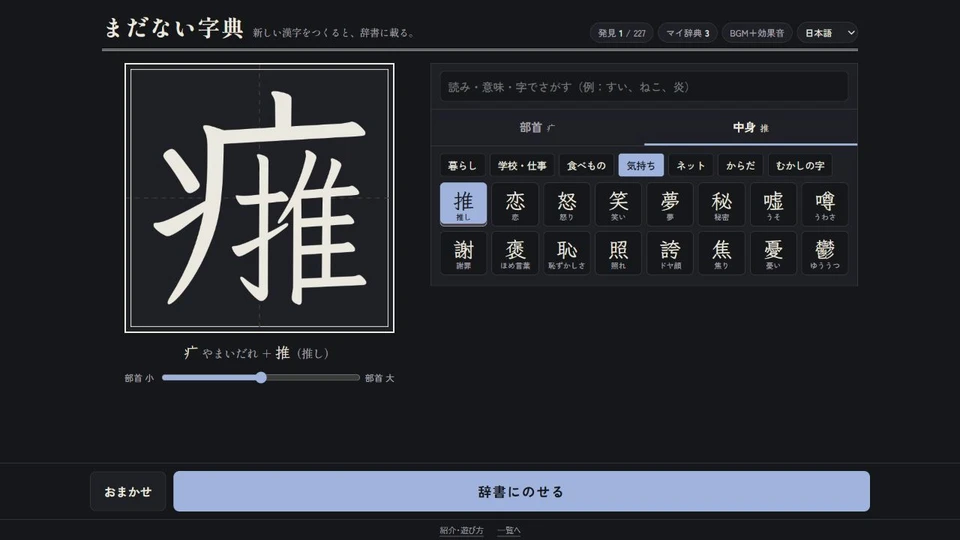
The Not-Yet Dictionary gameplay, showing the language menu at the top, 推 fitted inside the 疒 radical, and radical and character choices
The Not-Yet Dictionary gameplay screenshot

WHAT MAKES IT FUN

Key Features

Create a character with 54 radicals and 175 components

Choose radicals placed to the left, right, above, below or around a character, then select a character about daily life, work, feelings and more. There are 9,450 combinations. Use the slider to resize the radical and fine-tune your character's proportions.

A dictionary page with readings, a meaning and examples

Your creation receives a headword or reading, meaning, example sentences and construction explanation in your selected language. There are 193 curated combinations with specially written entries. Other combinations also become dictionary pages with text based on their radical and component.

Five judges and 14 verdict stamps

After the writing and judging animations, see the judges' votes and comments, and the stamp on your dictionary page. Collect 14 verdicts, including a fictional Kanji of the Year nomination, acceptance for the next edition and inclusion as a typo. These playful in-game verdicts depend on your combination and proportions.

Discover 227 characters that already exist

If your radical and character match an existing kanji in the game's table, the judges announce that it already exists. See its actual form, readings and meaning, and add it to your discoveries. Search can also show how familiar characters are assembled.

Your personal dictionary and stamp collection

Submitted characters are automatically saved in your personal dictionary in the same browser, so you can reopen their pages. The game also records curated combinations and existing kanji you discover, along with your verdict stamps. Share a favorite character as an image of its dictionary page.

Enjoy dictionary entries in five languages

Use the language menu at the top to choose Japanese, English, Traditional Chinese, Korean or Spanish. The interface, invented words, judges’ comments, verdict stamps, shared images and post text, and narration all use your chosen language. Verdicts and collection records stay the same across languages.

HOW TO PLAY

Getting Started

  1. 1. Choose a language, a radical and a character

    Choose your language from the menu at the top. Pick one component each from the Radical and Part tabs, browsing categories such as daily life, school and work, and food. Select Surprise me if you need a suggested combination.

  2. 2. Adjust the proportions with the slider

    Move the slider below the preview from a smaller to a larger radical. The layout adapts to the radical you choose. For enclosing radicals such as 疒 and 囗, the character fits the open space inside. An invented character with extreme proportions may be included as a typo.

  3. 3. Submit your character and see the judges' verdict

    Five judges deliberate over your newly written character. Select Skip to skip the animation. Read its readings, meaning, examples and construction on the resulting dictionary page, and see its verdict stamp.

  4. 4. Share the image and create another character

    Select Share result to share an image of the dictionary page. Select Make another to return to the editor and try another combination. Open My Dictionary or 発見 at the top to review your records.

CONTROLS

Controls

Language
Choose from five languages in the menu at the top. The first visit uses your browser’s language, or English if that language is unsupported. Your choice is saved in the same browser for future visits.
Tap, click and adjust the slider
Select components, tabs and category buttons by tapping or clicking. Adjust the proportions with the slider below the preview.
Search for components
Search by meanings and readings in your chosen language, kanji or radical names. Readings can be entered in hiragana for Japanese, romaji for English and Spanish, pinyin for Traditional Chinese, or Hangul for Korean. Searching for an existing kanji included in the game also shows an assembly hint.
Suggested combinations and skipping animations
Select Surprise me to choose a radical and character and reset the proportions to the center. During judging, select Skip to skip the animation and display the result.
Personal dictionary and discoveries
In My Dictionary, switch between your creations, stamps and discovered characters. Select a character's row to reopen its result. To remove a page, select Delete and press again while the confirmation Sure? is displayed.
Sound settings
The sound button at the top cycles through music and effects, effects only and mute. Close the result, personal dictionary or image-saving screen using its close or return button, or the Esc key.
Share and save result images
Select Share result to share the dictionary page and post text in your chosen language. On phones that support image sharing, choose an app in the share sheet. On computers and other devices, an X post opens. Save the image shown in the game using Save image, a long press or a right-click, then attach it to your post.
FAQ

Frequently Asked Questions

Is there a time limit or a score?

There is no time limit or numerical score. Try any combination in this creative game. Results receive a verdict stamp and rarity rating. Collect existing kanji, curated combinations and verdict stamps.

Will my creation enter a real dictionary or receive official recognition?

Dictionary inclusion and verdicts such as a Kanji of the Year nomination or approval for personal names are fictional parts of the game. They do not register your creation in a real dictionary or official system. The invented readings, meanings and construction explanations are also part of the game.

Why did my new character turn into an existing kanji?

If your combination matches one of the game's 227 existing characters, it counts as a discovery. The result uses the actual kanji form rather than the assembled shape shown in the preview. The game does not check every existing kanji.

Are my characters and collections saved?

Your personal dictionary automatically saves up to 300 submitted characters in the same browser, newest first. It also saves discovered existing kanji and curated combinations, verdict types and counts, sound settings and language. Records are shared across languages, and saved characters reopen in your chosen language. Deleting a page keeps discovery and stamp records. Records do not sync between devices or browsers, and clearing browser storage removes them.

Why is the dictionary image missing from my X post?

On phones that support image sharing, send the image through the share sheet. On computers and devices without image-sharing support, the X post does not attach the image automatically. Save the dictionary-page image shown in the game and attach it in the post editor.

Which languages are supported?

The game supports Japanese, English, Traditional Chinese, Korean and Spanish. Switch languages using the menu at the top. This introduction and how-to-play guide is available in Japanese and English. The game supports touch on phones and mouse controls on computers.

Do readings and meanings change with the language?

Invented characters receive localized coined words, meanings and examples, while their shapes and verdicts stay the same. Japanese shows on and kun readings; English and Spanish show romanized Japanese on readings; Traditional Chinese uses pinyin; and Korean uses Hangul readings. Judges’ comments, verdict stamps, shared images and post text, and narration also use your chosen language.

UPDATE HISTORY

Release & Update History

  1. Added five-language interface, dictionary pages and narration

    • Added English, Traditional Chinese, Korean and Spanish alongside Japanese. Choose a language at the top; your choice is saved in the same browser.
    • Localized invented headwords, meanings and examples, judges’ comments and verdict stamps, shared images and post text, and narration.
    • Saved characters, discoveries and verdict stamp collections remain available when you switch languages.
  2. X demo published

    • A demo of the game was published on X.
  3. Improved fitting within enclosing radicals and judging animations

    • Adjusted the character's size and position to fit the open space within radicals such as 疒, 辶 and enclosures.
    • The drumroll now stops when you select Skip to skip the judging animation.
  4. Added to ASTRA ARCADE

    • The game and its how-to-play guide were added to ASTRA ARCADE.

MORE FREE GAMES

Play Next in Your Browser

Manmaru Takoyaki

Manmaru Takoyaki

Flip them into perfectly round takoyaki.

Dopamine Overdrive

Dopamine Overdrive

One button. Inflate the digits of your damage.