Cook every step, from batter to serving
Pour batter, add octopus, slice the grid, flip the balls round, roll them to brown and serve. Enjoy every step of cooking 16 takoyaki with taps and swipes.
FREE BROWSER GAME GUIDE
Cooking / timingFlip them into perfectly round takoyaki.
No installation or sign-up required. Opens in a new tab.
A free browser takoyaki cooking game and takoyaki simulator you can play on mobile or PC with no installation needed. Try the authentic stall technique of making and flipping takoyaki: fill a 16-hole griddle with batter and octopus, slice the grid, flip each ball as it cooks, and roll to brown all six sides. Learn from a model play and challenge your best score.
WHAT MAKES IT FUN
Pour batter, add octopus, slice the grid, flip the balls round, roll them to brown and serve. Enjoy every step of cooking 16 takoyaki with taps and swipes.
Watch the underside to time the first and second flips. Flip too early and the ball breaks; too late and it becomes lumpy. Slicing the grid first also helps you tuck the skin in and make a round ball.
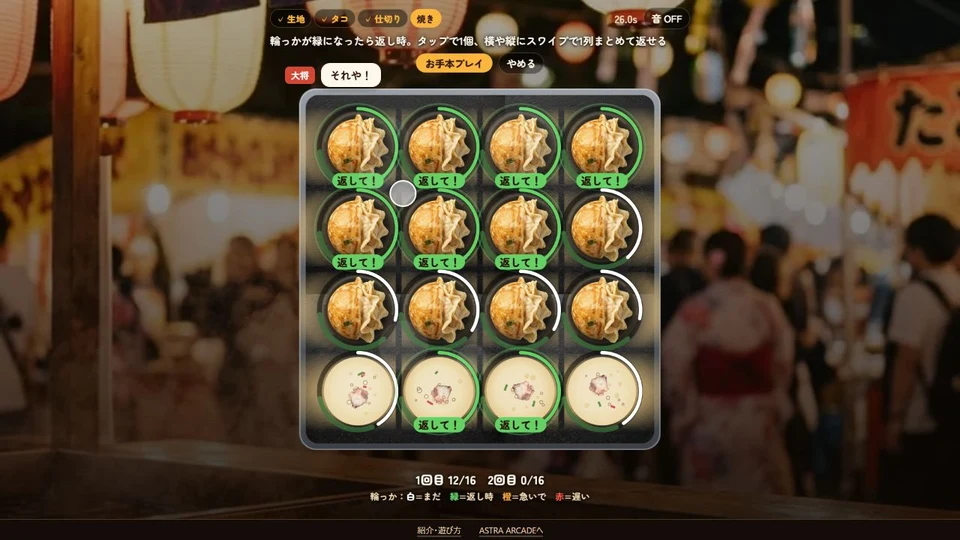
Each round ball has six sides to cook. Tap to roll one, or swipe across several to roll them together. Follow the rings, labels, totals and color legend to avoid raw or burnt sides.
Watch a model play with a moving finger showing every step from batter to serving, with waits fast-forwarded. Turn on Best pace to compare your progress with the highest-scoring of your last five games.
HOW TO PLAY
Press Start cooking, then hold and trace over the holes to pour batter. When all 16 rings turn green, choose Add octopus. Tap or trace the holes with dotted rings to add the octopus.
Swipe from edge to edge along three vertical and three horizontal lines. The batter starts cooking as soon as it is poured, so work quickly through the preparation.
Look for the Flip! label. Tap a ball or swipe horizontally or vertically to flip it. White means wait, green means flip, orange means hurry and red means late. After the first flip, watch the cooking again to time the second.
After flipping all 16 balls twice, roll them until all six sides are golden. Check their color and any burning warnings, then press Serve to finish. Review your result, try again or make and save a result image.
CONTROLS
FAQ
Turn on Status rings and start with balls showing a green ring and Flip! label. Flip before the underside overcooks. Both the first and second flips are judged; after that, work on browning all six sides evenly.
Scoring considers roundness from your flips and grid slicing, plus the browning of all six sides. Missing octopus also affects the total. Results show round-ball count, browning score, total, counts of broken, burnt, raw and octopus-free balls, and one of six ranks.
The browser saves only your selected language, the Status rings and Best pace settings, and the scores and pacing of your last five games. Model-play results are not recorded. Games in progress are not saved, so make and save an image card for any result you want to keep.
The game supports portrait phones and touch controls, as well as mouse dragging and clicking on a computer. If there is no sound, start the game and check its sound setting and your device volume.
UPDATE HISTORY
MORE FREE GAMES