FREE BROWSER GAME GUIDE

Rhythm pixel-art action

Dopamine Overdrive

One button. Inflate the digits of your damage.

No installation or sign-up required. Opens in a new tab.

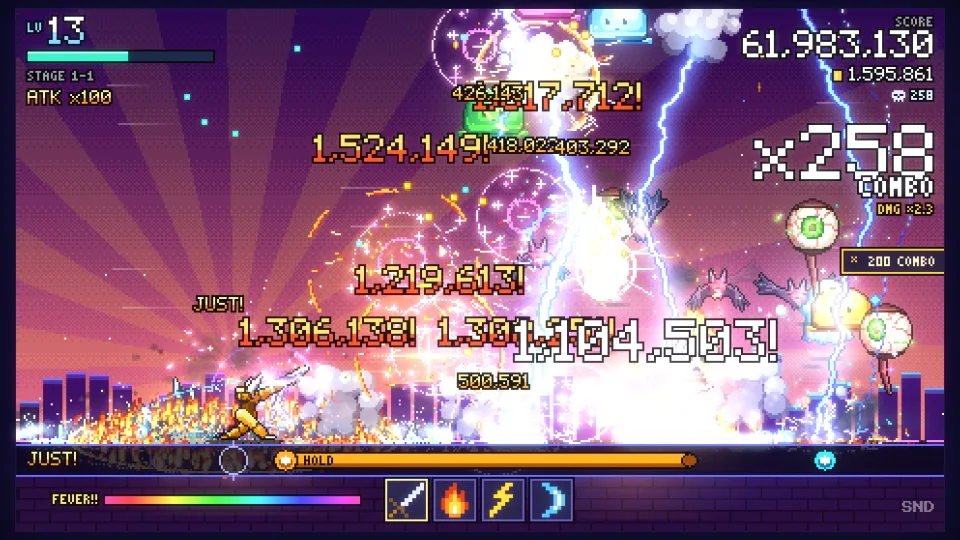
There is only one button. In this pixel-art rhythm action game, tap the moment a note scrolling under the floor overlaps the ring, and keep holding long bands until they end. The song of about 64 seconds is the stage itself: a swordsman cuts through swarms of enemies and moves on to a treasure chest, a roulette and a boss battle in the same order every time. How hard you hit is up to you, and the longer your combo, the more digits your damage gains. Claude Fable 5.2 turned the video "DOPAMINE OVERDRIVE" into a game you can actually play.

Dopamine Overdrive gameplay. A swordsman cuts through a swarm of enemies in a sunset city as million-scale damage numbers and lightning fly, with the score and a 258 combo at the top right, a JUST! judgment and a long HOLD note at the bottom, the fever gauge and four skills
Dopamine Overdrive gameplay screenshot

WHAT MAKES IT FUN

Key Features

One button: just tap and hold

Pressing anywhere on the screen, clicking or pressing Space all count as the same single button. Press as a note overlaps the ring for JUST!, or slightly off for GOOD. For a note with a trailing band, hold until the band ends (letting go within the last 0.14 seconds still counts). Missing a note, not pressing, pressing too early or letting go of a hold midway is a MISS and resets your combo to 0.
Combos inflate your damage

Every JUST! triggers a skill and raises critical hits and how many enemies you cut at once. The bigger your combo, the higher the damage multiplier, reaching ×5 at 800 combo. Pressing where there is no note costs nothing, but pressing just before the next note turns that note into a MISS.

Treasure, fever, roulette and a boss

In treasure-chest bars, every note you hit adds more coins. Hold a long riser all the way through to fill the fever gauge; during fever your score is doubled. In the roulette, each of the three red "7" notes you hit lines up a 7, and 777 deals full damage. Finally, a gold note delivers the finishing blow to the boss.

Three difficulties and ranks

Choose EASY (73 notes, mostly every other beat), NORMAL (124 notes, mostly every beat) or HARD (176 notes, with off-beat bursts). The timing windows and score multipliers (×0.6, ×1, ×1.5) also change with difficulty. Your rank depends on accuracy: SSS at 98% or more, SS at 94%, S at 88%, A at 78%, B at 60% and C below that. Best scores are kept for each difficulty.

HOW TO PLAY

Getting Started

  1. 1. Pick a difficulty and start

    Choose EASY, NORMAL or HARD on the title screen and press "スタート" (Start). On a keyboard, use the ←→ keys or 1, 2 and 3 to choose a difficulty. A bar fills while the game loads, and you can start once it finishes. The game plays sound, so mind your volume. Press "お手本を見る" (Watch demo) first to watch the chosen difficulty played automatically with every note a JUST!. Pressing the screen does nothing while you watch, and "やめる" (Stop) returns to the title at any time.

  2. 2. Press when a note overlaps the ring

    Press the moment a note scrolling in from the right under the stage overlaps the ring on the left. For notes followed by an orange or pink band, keep holding until the band ends. In portrait on a phone, a large note lane and a pad to press appear under the stage, and the pad shows what to do next (TAP / HOLD) and your judgment.

  3. 3. Check your rank on the results

    When the song ends, you see your score, max combo, JUST and MISS counts, and your rank. "もう一回" (Again) replays the same difficulty, and "難易度をえらぶ" (Choose difficulty) returns to the title. "結果を X でシェア" (Share on X) creates a post with your rank, accuracy and score. After a demo, the result shows "DEMO PLAY", and "自分でプレイ" (Play yourself) starts the same difficulty right away.

CONTROLS

Controls

PC
Click, or press Space, Enter, Z, X, J, K, F or D. Keep holding for long notes. On the title screen, choose a difficulty with the ←→ keys or 1, 2 and 3.
Phone
Tap anywhere on the screen; a ripple appears where you press. In portrait, a large note lane and a pad appear under the stage. Turn your phone sideways for a bigger stage.
Sound
The game is played to the music, so playing with sound on is recommended. Use "SND" at the bottom right of the stage to turn sound on or off.

FAQ

Frequently Asked Questions

What is saved?

Only the last difficulty you chose and your best score for each difficulty are saved in the same browser. A run in progress and demo results are not saved. The game remains playable where storage is unavailable.

I can't get the timing right

First use "お手本を見る" (Watch demo) to see when to press and how long to keep holding, then try EASY and watch the ring shrink until it overlaps a note. Pressing where there is no note costs nothing. If the sound reaches you late, for example through Bluetooth earphones, it is easier to press by watching the notes on screen rather than listening.

Is the song and its flow the same every time?

The song (about 64 seconds) and the order in which enemies, the treasure chest, the roulette and the boss appear are the same every time. The number and placement of notes change with the difficulty, and your damage and score depend greatly on how many JUST! hits you land and how long you keep your combo.

Can I play on a phone or in English?

It works on computers and phones, in portrait or landscape. The game screen is in Japanese, with judgments and scores in English letters. This guide and its controls can be read in English. It is free and needs no installation.

UPDATE HISTORY

Release & Update History

  1. Added a demo play

    • Added "お手本を見る" (Watch demo) to the title screen. It plays the chosen difficulty automatically, with every note a JUST! and every hold kept to the end.
    • Pressing the screen does nothing while you watch, and "やめる" (Stop) returns to the title at any time. In portrait on a phone, the pad shows a ripple at each press.
    • Demo results are marked "DEMO PLAY" and are not recorded as best scores. "自分でプレイ" (Play yourself) starts the same difficulty right away.
  2. Added to ASTRA ARCADE

    • The game and its how-to-play guide were added to ASTRA ARCADE.

MORE FREE GAMES

Play Next in Your Browser

Manmaru Takoyaki

Manmaru Takoyaki

Flip them into perfectly round takoyaki.

FUSION: H₁

FUSION: H₁

Launch hydrogen and grow a star through chains of fusion.