Their blink patterns are your clues
Each person's blink pattern repeats and stays the same when you retry, so what you learn helps with the next photo. The watch-list cards also offer hints for the people who need the closest attention.
FREE BROWSER GAME GUIDE
Observation & timingLearn their little habits. Catch one perfect moment.
No installation or sign-up required. Opens in a new tab.
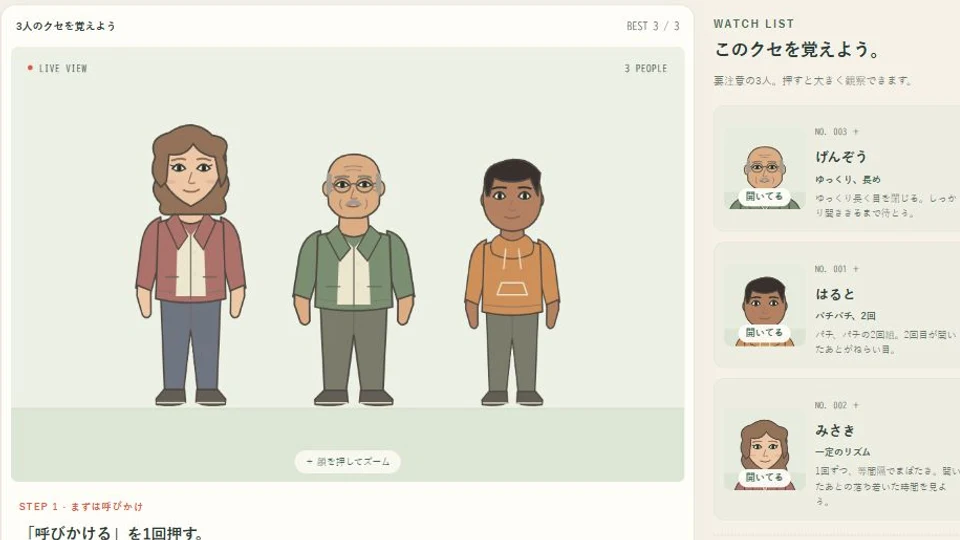
Some people blink in pairs; others close their eyes slowly. Learn each person's habits and take a group photo with every eye open. Start with three people and unlock the next stage with each perfect photo. There is no time limit: zoom in, watch carefully and press the shutter when the moment feels right.
WHAT MAKES IT FUN
Each person's blink pattern repeats and stays the same when you retry, so what you learn helps with the next photo. The watch-list cards also offer hints for the people who need the closest attention.
Select a face or card to move the camera closer. Everyone else keeps moving, and pressing the shutter while zoomed in still captures the whole group.
If anyone has their eyes closed, try the same group again. Capture every eye open to unlock the next stage. Locked group sizes appear as a question mark, keeping the next gathering a surprise until you succeed.
Save a photo card with your group picture and a character's comment. Perfect photos can also be saved as clean pictures without text. Devices that support image sharing can share the photo and caption together.
HOW TO PLAY
The game opens with the first three people in the viewfinder. Press ① Call and wait for everyone to look up.
Select a watch-list card or a face in the viewfinder to zoom in. Notice who keeps their eyes open for longer and who blinks several times in a row. Watch as many cycles as you need.
Press ② Take photo when you think every eye is open. The result shows how many people had their eyes open and lets you inspect the faces that missed the moment.
Choose Try the same group again to put the rhythms you learned to use. A perfect photo lets you move to the next stage. Save any pictures you want to keep.
CONTROLS
FAQ
No. After calling, you can watch as many cycles as you like before taking a photo. Switching to another tab or window cancels the call, so start again with ① when you return.
Zooming is for observation. Your photo always includes the whole group, even when zoomed in. Everyone also keeps blinking while you watch a close-up.
Unlocked stages, personal bests and your selected language are saved in the same browser when storage is available. The six recent pictures in Today's album disappear when you reload the page, so download any photos you want to keep.
On supported devices, select Share photo and caption and choose a destination. Otherwise, use ① Save share image, then ② Open X composer and attach the saved picture yourself. The game never posts automatically.
UPDATE HISTORY
MORE FREE GAMES